Content

0 comments

Vibrant Style 3 columns adsense ready

Vibrant Blogger XML Template
* 3 columns
* 3 tabbed ajax menu
* Stylish navigation menu
* Supports widgets on Blogger
* XML template
* Adsense Ready
* XHTML & CSS compliance
* Re-edited for newbies


DEMO | DOWNLOAD

How to install this template?
1. Don't forget to replace the FEED-URL into your Feed URL Address
2. Upload all the files on the Images Folder into your Googlepages.
3. Then rename all the YOUR-GOOGLE-PAGES-NAME into your googlepages name
For example:

* http://YOUR-GOOGLE-PAGES-NAME.googlepages.com/vt-bg.gif

Become
http://MisterWong.googlepages.com/vt-bg.gif
4. Done

3 columns adsense ready template for blogspot, adsense ready blogger templates, free download blogger template for adsense, blogger adsense template, adsense template for blogspot, free download adsense blogger templates.

Update 2
i see that this template is having problems while showing blockquote texts , heres a simple solution

find these lines :

blockquote p {
font-family: georgia, arial;
line-height: 1.5em;
font-size: 12px;
color: #366799;
}

and replace with these

blockquote {
font-family: georgia, arial;
line-height: 1.5em;
font-size: 11px;
color: #366799;
}

preview and save

If you want more , you can support me
Read more »
0 comments

Blogger Template: Zinmag Tribune


Template name: Zinmag Tribune
Template Author: Jinsona Design
Template Converter: Falcon Hive
Compatible BSP: Blogger
Instructions: Installation and settings Best Viewed Browser: Internet Explorer 8, Firefox RC3, Opera 9.6, Google Chrome 0.3.154.9
Column: 4
Feature (9): White professional magazine style design, double header navigation bar, featured content scroller, featured content glider, featured-video section, 4 ads space, Javascript-based tabber, 3 footer gadget section, footer navigation bar

You can observe the demo or download the Zinmag Tribune Blogger template.
Read more »
0 comments

Blogger Template: Desk Mes


Template name: Desk Mess
Template Author: Geek With Laptop
Template Converter: Falcon Hive
Compatible BSP: Blogger
Instructions: Installation and settings
Best Viewed Browser: Firefox RC3, Opera 9.6, Google Chrome 0.3.154.9, Internet Explorer 8
Column: 2
Feature: Artistic Header Graphics and Wooden Background, Navigation bar

You can observe the demo or download the Desk Mess Blogger template or its image hosted version.
Read more »
0 comments

Blogger Template: Seabreeze


Template name: Seabreeze
Template Author: FTL
Instructions: Installation and settings
Template Converter: Falcon Hive
Compatible BSP: Blogger
Best Viewed Browser: Firefox RC3, Opera 9.6, Google Chrome 0.3.154.9, Internet Explorer 8
Column: 2
Feature: Navigation bar, Search Bar, Ads Space

You can observe the demo or download the Seabreeze Blogger template and its image hosted version.
Read more »
0 comments

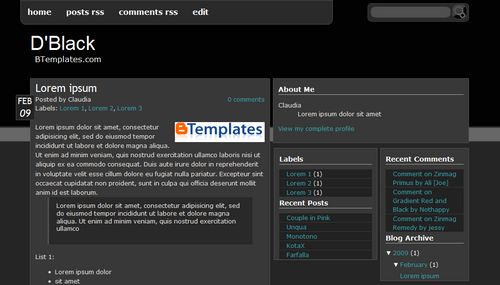
D Black Blogger template

Here is new black blogger template.
This template was made by Cebong Ipiet
Properties : 3 Columns, Black, Fixed width, Right sidebar
Category : Black, White, Neutral.


DEMO | DOWNLOAD
Read more »
0 comments

How to Display ads below Post Title in Blogspot

Ad placement position in the blog we have a click through rate on the ad. Therefore, your ads have high CTR, we must be clever-clever set the size and position of the ad placement on our blog.
What is needed to do that?
Needed only to install Selective EXPANDABLE Post Hack.
Let's do.

Selective install EXPANDABLE
1.Log in to Blogger dashboard> Select Layout> HTML, check the Expand Widgets Templates
2.Search </head>
3.Copy and paste the code below just above the </head> tag

<b:if cond='data:blog.pageType != "item"'>
<script type="text/javascript">

var fade = false;
function showFull(id) {
var post = document.getElementById(id);
var spans = post.getElementsByTagName('span');
for (var i = 0; i &lt; spans.length; i++) {
if (spans[i].id == "fullpost") {
if (fade) {
spans[i].style.background = peekaboo_bgcolor;
Effect.Appear(spans[i]);
} else spans[i].style.display = 'inline';
}
if (spans[i].id == "showlink")
spans[i].style.display = 'none';
if (spans[i].id == "hidelink")
spans[i].style.display = 'inline';
}
}

function hideFull(id) {
var post = document.getElementById(id);
var spans = post.getElementsByTagName('span');
for (var i = 0; i &lt; spans.length; i++) {
if (spans[i].id == "fullpost") {
if (fade) {
spans[i].style.background = peekaboo_bgcolor;
Effect.Fade(spans[i]);
} else spans[i].style.display = 'none';
}
if (spans[i].id == "showlink")
spans[i].style.display = 'inline';
if (spans[i].id == "hidelink")
spans[i].style.display = 'none';
}
post.scrollIntoView(true);
}

function checkFull(id) {
var post = document.getElementById(id);
var spans = post.getElementsByTagName('span');
var found = 0;
for (var i = 0; i &lt; spans.length; i++) {
if (spans[i].id == "fullpost") {
spans[i].style.display = 'none';
found = 1;
}
if ((spans[i].id == "showlink") &amp;&amp; (found == 0))
spans[i].style.display = 'none';
}
}
</script>
</b:if>

4.Search code below and add the red code into it.

<div class='post-body' expr:id='"post-" + data:post.id' >
<b:if cond='data:blog.pageType == "item"'>
<style>#fullpost{display:inline;}</style>
<p><data:post.body/></p>
<b:else/>
<style>#fullpost{display:none;}</style>

<p><data:post.body/></p>
<span id='showlink'>
<a expr:href='data:post.url'>Read More......</a>
</span>
<script type='text/javascript'>
checkFull("post-" + "<data:post.id/>");
</script>
</b:if>

<div style='clear: both;'/> <!-- clear for photos floats -->
</div>

5. Save Your Template.
6. Go to Settings > Format, and search Post Template. Copy and paste the code in the form below to post Template.

Type your summary here
<span id="fullpost">
Type rest of the post here
</span>

7. Save it. EXPANDABLE Post Hack Done

Now time to add your adsense or whatever code to your blog.

Show adsense below Post title on blogger.

<b:if cond='data:blog.pageType == "item"'>
<style>#fullpost{display:inline;}</style>
Add your code here
<p><data:post.body/></p>
<b:else/>

Save it and You're done!

Read more »
0 comments

Blogger Template: Gramophonica


Live Demo : Download

Template name: Gramophonica
Template Author: Ezwpthemes
Template Converter: Falcon Hive
Compatible BSP: Blogger only

Best viewing Browser: Firefox RC3, Opera 9.6, Google Chrome 0.3.154.9
Column: 2
Gadget: Ready
Navigation Bar: Ready
Search Bar: Ready

Instructions: Installation and settings
Read more »
0 comments

Blogger Template: Zinmag Primus


Live Demo : Download

Theme Author: Jinsona Design
Converted By: Alvaris Falcon
Instructions: Installation and settings
Category: 3 Columns, Ads Ready,Fixed Width,Right Sidebar,Support Available
Read more »
0 comments

Recent Post Thumbnails Widget for Blogger


I finally found a widget that shows post thumbnails that is easily configurable and much more universal than the FriendFeed widget I used previously at VietWebGuide.com. Though Google Translator failed I was able to cipher the article and thought I'd share...

Backup your template and then copy and paste the following code into an HTML widget in your Page Elements on the Layout section of your Blogger blog:


Read more »
0 comments

Random Rotating Post Headliner Widget for Blogger Blog - Google Ajax

From this tutorial you will be able to add 'Random rotating post headliner widget' to your blogger blog. It rotates all your posts in simple table, with post title link and summary of the post.You can see the screenshot below. You can see the live demo here.


Step needs to add this widget in your blogger template

1. Login in to blogger dashboard

2. Go to 'Layout'

3. click on 'Add a Gadget' or Add a Page Element'

4. Popup window will appear, Click on 'HTML/Javascript'

5. Now Copy and paste the following code into the window

5. Now Copy and paste the following code into the window

5. Now Copy and paste the following code into the window


<style type="text/css">
.gfg-root {
width : 100%;
height : auto;
position : relative;
overflow : hidden;
text-align : center;
font-family: "Arial", sans-serif;
font-size: 20px;
border: 1px solid #BCCDF0;
}

.gfg-title {
font-size: 24px;
font-weight : bold;
color : #3366cc;
background-color: #E5ECF9;
line-height : 1.4em;
overflow : hidden;
white-space : nowrap;
}

.gfg-title a {
color : #3366cc;
}

.gfg-subtitle {
font-size: 20px;
font-weight : bold;
color : #3366cc;
background-color: #E5ECF9;
line-height : 1.4em;
overflow : hidden;
white-space : nowrap;
margin-bottom : 0px;
}

.gfg-subtitle a {
color : #3366cc;
display:none !important;
}

.gfg-entry {
background-color : white;
width : 100%;
height : 6.9em;
position : relative;
overflow : hidden;
text-align : left;
margin-top : 3px;
}

/* To allow correct behavior for overlay */
.gfg-root .gfg-entry .gf-result {
position : relative;
background-color : white;
width : auto;
height : 100%;
padding-left : 20px;
padding-right : 5px;
}

.gfg-list {
position : relative;
overflow : hidden;
text-align : left;
margin-bottom : 5px;
display:none !important;
}

.gfg-listentry {
line-height : 1.5em;
overflow : hidden;
white-space : nowrap;
text-overflow : ellipsis;
-o-text-overflow : ellipsis;
padding-left : 15px;
padding-right : 5px;
margin-left : 5px;
margin-right : 5px;
}

.gfg-listentry-odd {
background-color : #F6F6F6;
}

.gfg-listentry-even {
}

.gfg-listentry-highlight {
background-image : url('garrow.gif');
background-repeat: no-repeat;
background-position : center left;
}

/*
* FeedControl customizations.
*/

.gfg-root .gfg-entry .gf-result .gf-title {
font-size: 24px;
line-height : 1.2em;
overflow : hidden;
white-space : nowrap;
text-overflow : ellipsis;
-o-text-overflow : ellipsis;
margin-bottom : 2px;
}

.gfg-root .gfg-entry .gf-result .gf-snippet {
height : 3.8em;
color: #000000;
margin-top : 3px;
}

/*
* Easy way to get horizontal mode, applicable via js options to gadget.

*/

.gfg-horizontal-container {
position : relative;
}

.gfg-horizontal-root {
height : 1.5em;
_height : 100%;
position : relative;
white-space : nowrap;
overflow : hidden;
text-align : center;
font-family: "Arial", sans-serif;
font-size: 13px;
border: 1px solid #AAAAAA;
padding : 5px;
margin-right : 80px;
}

.gfg-horizontal-root .gfg-title {
font-weight : bold;
background-color: #FFFFFF;
line-height : 1.5em;
overflow : hidden;
white-space : nowrap;
float : left;
padding-left : 10px;
padding-right : 12px;
border-right: 1px solid #AAAAAA;
}

.gfg-horizontal-root .gfg-title a {
color : #444444;
text-decoration : none;
}

.gfg-horizontal-root .gfg-entry {
width : auto;
height : 1.5em;
position : relative;
overflow : hidden;
text-align : left;
margin-top : 0px;
margin-left : 0px;
padding-left : 10px;
}

/* To allow correct behavior for overlay */
.gfg-horizontal-root .gfg-entry .gf-result {
position : relative;
background-color : white;
width : 100%;
height : 100%;
line-height : 1.5em;
overflow : hidden;
white-space : nowrap;
}

.gfg-horizontal-root .gfg-list {
display : none;
}

/*
* FeedControl customizations.
*/

.gfg-horizontal-root .gfg-entry .gf-result .gf-snippet,
.gfg-horizontal-root .gfg-entry .gf-result .gf-author {
display : none;
}

.gfg-horizontal-root .gfg-entry .gf-result .gf-title {
color: #0000cc;
margin-right : 3px;
float : left;
}

.gfg-horizontal-root .gfg-entry .gf-result .gf-spacer {
float : left;
}

.gfg-horizontal-root .gfg-entry .gf-result .gf-spacer,
.gfg-horizontal-root .gfg-entry .gf-result .gf-relativePublishedDate {
display : block;
color: #AAAAAA;
}

.gfg-branding {
white-space : nowrap;
overflow : hidden;
text-align : left;
position : absolute;
right : 0px;
top : 0px;
width : 80px;
}

.gfg-collapse-open, .gfg-collapse-closed {
background-repeat : no-repeat;
background-position : center;
cursor : pointer;
float : right;
width : 17px;
height : 20px;
}

.gfg-collapse-open {
background-image : url('arrow_open.gif');
}

.gfg-collapse-closed {
background-image : url('arrow_close.gif');
}

.gfg-collapse-href {
float : left;
}

.clearFloat {
clear : both;
}
body {
background-color: white;
color: black;
font-family: Arial;
font-size: small;
margin: 0;
}
#feedGadget {
margin-top : 5px;
margin-left: auto;
margin-right: auto;
width : 440px;
font-size: 16px;
color: #9CADD0;
}
</style>
<script src="http://www.google.com/jsapi/?key=internal-sample"
type="text/javascript"></script>
<script src="http://www.google.com/uds/solutions/dynamicfeed/gfdynamicfeedcontrol.js" type="text/javascript"></script>

<script type="text/javascript">

function showGadget() {
var feeds = [
{title:'title',
url:'http://BLOG_URL.blogspot.com/atom.xml?redirect=false&start-index=1&max-results=999'},

];

new GFdynamicFeedControl(feeds, 'feedGadget',
{numResults : 1000, stacked : true,
title: "BLOG_TITLE ~ Random Posts."});
}
google.load("feeds", "1");
google.setOnLoadCallback(showGadget);
</script>
<div id="feedGadget">Loading...</div>
<div id="feedGadget">Gadget by <a href="http://www.blogdoctor.me" target="_blank">The Blog Doctor</a>.</div>


6. Replace letter in red with your blogger URL, and black with Blog Name.


7. If you want this widget to be appear below header than move the gadget above the blog posts as show in the following fig.()

8. Save Settings.

By : BlogDoctor
Read more »
0 comments

Fixing Blogger Sitemap Errors and Warnings Inside Google Webmaster Tools

You may know about Google Webmaster Tools. Here you can submit your blog/website sitemap to index your pages in Google. This hack is for blogger blog who get error message while submitting blogger generated 'atom.xml' feed sitemap to Google Webmaste Tools. If you are using feedburner service to redirect your blogger feeds, you will see this error message. Sitemap file for blogger blog looks like

http://yourblogname.blogspot.com/atom.xml.


The following Sitemap errors and warning messages are shown for my sitemap (atom.xml) in the Google WebMaster Tools , when using Blogger feeds with FeedBurner.


Even though you are submitting blogger made 'atom.xml' sitemap file to Google Webmaster Tools, its returning you with invalid XML warning message. Its because, you are using feedburner service to redirect your 'atom.xml' feed to feedburner feed.

To fix this problem, delete the existing sitemap and submit new modified atom feed sitemap url as below

http://yourblogname.blogspot.com/atom.xml?redirect=false

Replace letter in red with your blog url

From this hack your blog Feeds will still be redirected to FeedBurner but for 'Google webmaster Tools' submitted Sitemaps, the redirection won't happen.


Submitting Sitemap to Google Webmaster Tools

# Go to Google Webmaster Tools Dashboard >> Sitemaps

# Enter your modified atom feed as shown in below fig. and submit it...


Here's is the new submitted sitemap with no errors and warnings. You can see the changes in feed format from RSS Feed to Atom Feed.

Read more »
0 comments

Create DropDown Feed Subscription Button & Social Bookmark Link for Your Blogs - Chicklet Creator

The objective of iFeedReaders is simple, create a one central place to send your feed and have all the subscription services coded and ready to go.

Those of you who are not to technical minded, you can create a simple link or drop down and add it to your site like any other link. No code editing, just create one simple link.

Chicklet Creator | Social Bookmark Link Creator
Read more »
0 comments

Protect Your Blog From Plagiarize (Copy Paste)

May be you will be angry if your articel shown in other blog unexpectedly, moreover it without inserting the resource. I'll show you how to protect your blog from theif. But this trcik is pointed for small thief because it unusefull for expert thief. With this trick, the thief will unable to select your articel and unable to right click in your blog. But if you don't care about plagiarize, you will don't need this trick. Ok lets begin.

Go to your blog setting then chose "Template --> Edit HTML". Find this code <body> then replace with this code

<body onmousedown="return false" oncontextmenu="return false" onselectstart="return false">

Now your blog will be disable selecting and righ click, but the thief can still steal your articel by select "views --> page source" menu from their browser or by pressing "Ctrl + u", they can see your source code and can copy the articel from it. To deceive this, put your mouce cursor before this code <head> then press "enter" button many times, may be about 100 times the save your editting . Now if they press "Ctrl + u" they will only see a litle codes, he..he..

But remember this trick is only work for a fool thieves, for an expert thieves is unusable.
I don't use it into my blog because there are many script that have to be copied by readers.
Read more »

Categories

Fixed (2074) 2 Column (1778) White (1765) 1 Right Sidebar (1443) Bookmark Ready (806) Black (750) Gray (707) 3 Column (633) Elegant (609) Blue (592) 1 Left Sidebar (590) Brown (523) Custom Navbar (276) Green (273) Magazine (258) 2 Right Sidebar (245) Red (174) Left and Right (141) Girly (134) Floral (132) Gallery (116) Yellow (93) Orange (88) Pink (83) News (65) Natural (63) Vector (56) Violet (48) 1 Column (41) Fashion (27) Movie (16) Video (13) Space (11)
OnLine Media. Powered by Blogger.

Followers

OnLine Media friends